CybrIQ for education · K-12, higher ed, research
CybrIQ for education

Every device on your network, identified and accounted for. Without touching a single student or staff device.

The asset register says one thing. The network shows another. CybrIQ identifies every device on every managed switch port at Layer 1, against a 750-million-device reference library, and produces a continuous inventory the IT team and the security team can both work from.

  • Chromebooks that left the building, never returned, and never got marked as gone.
  • Classroom AV from last summer's refresh, installed by an integrator and never logged.
  • Lab instruments that arrived on grant funding, outside the central IT loop.
  • Building automation that facilities added to the network without telling anyone.
Schedule a working session › How it works
No agents on devices Identification happens at the switch via read-only access. Nothing is installed on chromebooks, faculty laptops, lab instruments, or classroom AV gear.
No FERPA-protected data We do not see, store, or transmit student records. Our scope is the network layer underneath the systems that hold that data.
Built for shared environments Designed for environments with high device turnover, BYOD, contractor work, and grant-funded equipment. The inventory keeps up because it reads what is on the wire today.
E-Rate and audit ready Signed monthly inventory exports (CSV, JSON with SHA-256, plus a forwardable PDF) attach to E-Rate funding documentation, cyber-insurance applications, and audit cycles.
The honest problem

The asset register and the network never agree, and the gap matters more every year.

The asset spreadsheet was accurate the day it was last updated. Then a building renovation added a dozen smart displays. A teacher brought in a personal projector. A grant-funded research instrument arrived with its own embedded compute. A vendor swapped a chromebook cart and didn't update the bar-coded list. A facilities contractor put a new HVAC controller on the network without telling anyone. Multiply by 18 buildings, 24 months, three IT staff turnovers, and the gap is no longer something the team can close manually.

For most institutions, this gap stays invisible until something forces it into view. The cyber-insurance carrier asks for current hardware inventory at renewal. The state auditor asks for an asset list keyed to the controls in the SOC 2 or NIST report. The federal grant office asks for a Section 889 attestation on covered-entity hardware in a research lab. The K12 SIX essentials checklist asks for "an accurate, current inventory of network-connected devices." None of those requests can be answered honestly from a spreadsheet.

What we see

A typical classroom or lab port carries more devices than the inventory thinks.

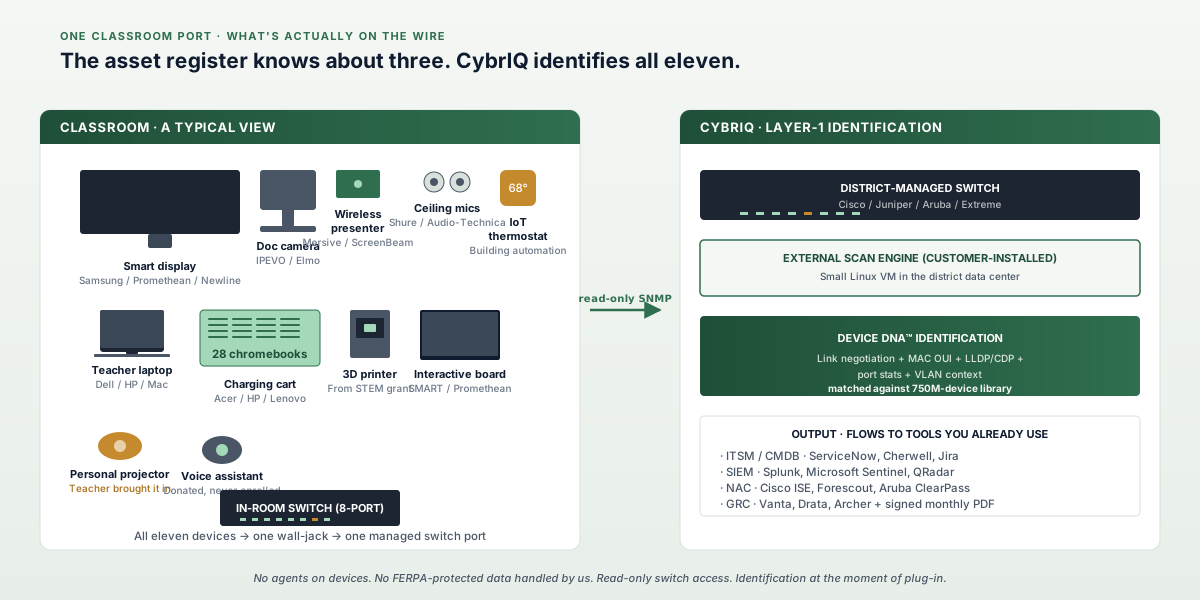
The diagram below names the devices we routinely identify on a single switch port serving a classroom or research space. Some belong to IT. Some belong to facilities. Some belong to whoever happened to be in the room last week. All of them are on the network the moment they get plugged in.

A diagram of a typical K-12 classroom or higher-education lab from a network-visibility perspective. The room contains a smart display at the front, a wireless presenter dongle on the table, a document camera, two ceiling microphones, a teacher laptop, a row of student chromebooks on a charging cart, a 3D printer left over from a STEM grant, an interactive whiteboard, a smart thermostat from a building-automation refresh, and a personal projector a teacher brought in. Every device attaches to one managed switch port through a wall jack and a small in-room switch. The CybrIQ External Scan Engine reads the managed switch via SNMP with read-only credentials, identifying each device at Layer 1 against a 750-million-device reference library. The inventory output flows to the customer's existing ITSM and GRC tools.
Who this is for

Three audiences. One method. Different scopes.

CybrIQ ships in two scopes (RoomIQ for room-level work, SpacesIQ for whole-building or campus-wide). The technical method is identical; the operating shape changes by audience.

K-12 districts

Chromebook fleets, classroom AV, building IoT

Continuous inventory across district-managed switches. E-Rate documentation, K12 SIX essentials checklist, and cyber-insurance evidence in one signed monthly export. Designed for IT teams of two to ten people supporting hundreds of devices per building.

Read the K-12 page ›

Higher education

45,000+ endpoints, BYOD, classroom AV, dorm IoT

Continuous inventory across the whole campus switch fabric. Cross-departmental visibility for the CIO, the security office, and the network team without forcing a single console on any of them. Each team consumes the inventory in the tool they already work in (ServiceNow CMDB, Splunk, Cisco ISE).

Read the higher-education page ›

Research labs

Scientific instruments, federal grant compliance

Lab instruments arrive with their own networking, often outside the IT team's procurement loop. CybrIQ identifies every instrument the moment it appears on the wire, attests Section 889 covered-entity status, and produces grant-audit-ready evidence for NIH, NSF, and DoD-funded work.

Read the research-lab page ›

In one paragraph

A continuous, evidence-grade device inventory the IT team can actually maintain.

CybrIQ deploys an External Scan Engine on customer hardware inside the institution's network. The scan engine reads each managed switch via SNMP with read-only credentials, captures Layer-1 signals (link negotiation, MAC OUI, LLDP and CDP advertisements, port statistics, VLAN context), and matches the resulting fingerprint against a 750-million-device reference library to produce a vendor-and-model identification per port. The main CybrIQ instance runs in the cloud by default, with an on-premise option for institutions that prefer it. Output flows to whatever the IT team already uses: ServiceNow, ITSM, Splunk, Microsoft Sentinel, Cisco ISE, Forescout, Aruba ClearPass, and the GRC platform that holds the audit evidence. Nothing is installed on student devices, on faculty laptops, on lab equipment, or on classroom AV. There is no traffic mirroring, no SPAN port, no inline tap.

What changes for the IT team

The asset register stops being a manual project. The inventory shows what is on the network today, not what the spreadsheet said three months ago. The team's time goes back to the work that actually moves the institution forward.
Schedule a 30-minute working session.

The session is consultative, not a sales pitch. We learn about your environment, share where CybrIQ has fit similar institutions, and answer the questions you came in with. No slide deck, no procurement commitment, no proposal pressure.

Schedule a working session